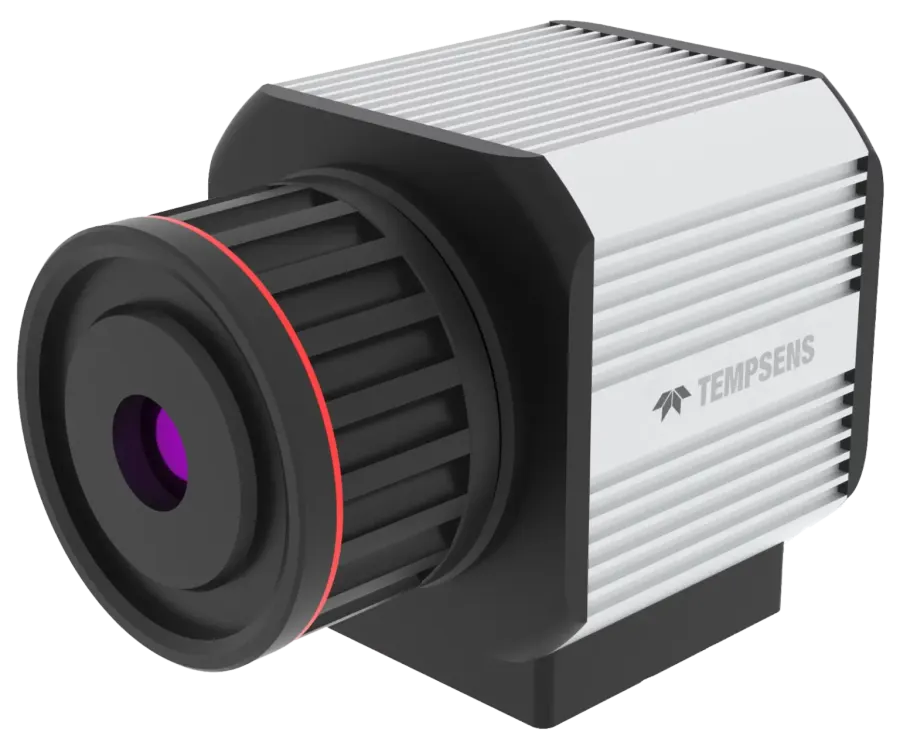
Caméra thermique compacte ThermCAM-80, entrée de gamme

TEMPSENS · ThermCAM-80

ThermCAM-80 Low Resolution Economical Thermal Camera

Low Resolution, Economic Temperature Range : -20 to 1000°C Resolution : 80 x 80 pixels

Request a quote

Category: Industrial sensors · Thermal imaging cameras

Specifications by model

CharacteristicValue
Temperature range– 20 to 120°C | 100 to 1000°C (Switchable via Software) Other temperature ranges (upto 1000°C) are also available on request.
Optional resolution80 x 80 pixels
DetectorUncooled FPA detector
Frequencyup-to 25Hz
Emissivity0.01 – 1.0 adjustable
Tolerance±2% of reading in °C or °K (Ambient temp @25°C)
Spectral range8 to 14 μm
Sensitivity / NETD<100mK@f1.0, 50Hz 300 K
Pixel pitch34 μm
Digital100MBit/s Ethernet
ConnectionPower Connector, RJ-45 Ethernet Connector
Output4 – 20mA | 1 TTL output
Video format for savingMPEG-4
Image format for savingBMP/JPEG
Power supply12 to 28 V DC
Power consumption<4 Watt
Ambient temperature0°C – 60°C
Storage temperature-40°C – 70°C
Relative humidity≤95% non-condensing
Shock resilience25G
Vibration resilience2g
Weight~550g (with 5.56mm lens)
Protection class~IP65
Dimensions60 x 70 x 95 mm (with 5.56 mm lens)
EMCCE
MountingUNC 1/4”-20, UNC 3/8”-16 Standard Mount
Focal distance5.56mm (Standard Lens)
Field of view28°(H) x 28°(V)
FocusManual focus

Full description

Currently industries are using spot temperature pyrometers to measure the temperature of critical points. ThermCAM-80 can replace such pyrometers with better area coverage and will also give individual pixel temperatures. Also, ThermCAM-80 has the advantage of showing the thermal image which makes it more suitable for continuous monitoring of critical assets. Applications Critical Assets Process Automation Electric Equipment Inspection Conveyer Belt Monitoring Traffic Control Building thermography around thermal bridges and localization of weak points in walls Early Fire Detection Quality Management HVAC Inspection Clinker/Coal/Coke/Pellet/Sinter Conveyor Condition Monitoring Fume Stack Monitoring Research and Development Experience unparalleled thermal imaging precision and affordability with the ThermCAM 80, backed by the power of InfraVIEW software , catering to many industrial applications. • ThermCAM-80 works at a long wavelength range from 8 – 14 μm. • Configurable storage and temperature video recording. • ThermCAM -80 can be used as a standalone system with a built in 4-20 mA and TTL O/P • Provide continuous thermal video in InfraVIEW software in PC via an Ethernet connectivity • High shock and vibration tolerance for maintenance-free operation • Multiple ThermCAM-80 can be connected to a single InfraVIEW software . Features: Part Code: ThermCAM-80 Economic & Modern Alternative For Spot Temperature Measurement, IR Thermometer Temperature Measurement Range: -20°C to 120°C | 100°C to 1000°C (Switchable via InfraVIEW Software) Other temperature ranges (up to 1000°C) are also available on request. InfraVIEW Software Hightlight Performance Specifications Interface Specifications Electrical Specifications Environmental / Mechanical Specifications Lens Specifications CoolingJacket HDD : 1 TB or Higher 2 Nos Gigabit Ethernet port Operating System : Windows 10 Pro Wall Mounting Power Supply Network Accessories InfraVIEW software is included as a standard scope of supply with our Thermal Imaging Cameras. This is a windows-based software which is particularly dedicated for industrial thermal imaging applications. The InfraVIEW software provides easy and quick framework for the documentation of the recorded raw data which has been continuously captured through thermal camera. InfraVIEW software provides high-speed real time data acquisition through which one can easily record, view analyse and store the captured thermal videos/ images as well as the temperature data. It also allows captured temperature data to be integrated to I/O modules or can be connected to PLC via OPC/UA server. Salient features of InfraVIEW Software: Real-time display of thermal images. Includes 9 different colour palates, according to user application. Multiple types of ROI including point, line, and area with min./max./avg. temperature display. Histogram and trend chart of ROI can be generated for data analysis. Temperature Display on Mouse Over. Alarm generation for entire or ROI based on minimum, maximum or average temperature.

In the same family